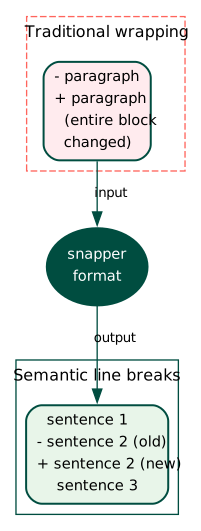
A small change, a large diff#
Consider a paragraph in a paper you’re writing with three collaborators. Someone changes a single number. Git marks every line in the paragraph as modified.
The reason: text editors wrap paragraphs at fixed column widths. Changing one word shifts everything after it to new line positions. The diff becomes a wall of red and green, and the reviewer has no efficient way to find what actually changed.
This happens in every collaborative paper. It happens whether you use LaTeX, Org-mode, Markdown, or plain text. The underlying issue has nothing to do with git and everything to do with how we format source files.
The fix predates git#
Put one sentence on each line. Don’t wrap at 80 columns. Let each sentence stand as its own unit.
Brandon Rhodes wrote about this back in 2012. The sembr.org convention formalizes it: break after each sentence, optionally after major clause boundaries.
The rendered output stays identical. LaTeX, HTML, and Org-mode treat a single newline as whitespace. Two coauthors editing different sentences in the same paragraph produce clean, non-overlapping diffs.
Here’s the before:
Molecular dynamics simulations of the Lennard-Jones fluid were performed at
constant temperature and pressure using a Nose-Hoover thermostat. The system
contained 4096 particles in a cubic box with periodic boundary conditions.
Production runs lasted 10 ns after 2 ns of equilibration.
And the same text with semantic line breaks:
Molecular dynamics simulations of the Lennard-Jones fluid were performed at constant temperature and pressure using a Nose-Hoover thermostat.
The system contained 4096 particles in a cubic box with periodic boundary conditions.
Production runs lasted 10 ns after 2 ns of equilibration.
Change “10 ns” to “20 ns” in the second version. Git highlights exactly one line.
The automation problem#
Editors fight this convention.
VS Code hard-wraps.
Emacs fill-paragraph destroys the structure.
Every editing pass demands manual rewrapping: find the sentence boundary, press Enter, check the next one.
Doing this by hand works for a while. It doesn’t scale when you’re pushing revisions daily across multiple papers.
Snapper#
We built Snapper to automate the reformatting. It parses Org-mode, LaTeX, and Markdown, finds sentence boundaries, and restructures the file.
It runs as:
- a CLI tool (
snapper format paper.org) - a VS Code extension that formats on save
- a Neovim plugin
- a pre-commit hook
- a git filter (transparent reformatting on commit)
The pre-commit hook catches the most common failure: editing in a rush, forgetting to reformat, pushing a commit that rewraps half the file.
Snapper is free and open source. We maintain it at TurtleTech because the diff problem affects everyone who writes collaboratively in version control, and the fix should cost nothing.